How to Delete Your Baserow Account and What Happens Next
Deleting a Baserow account in the open-source edition happens in two stages: the deletion is scheduled first, and the account and its data are only actually gone once the default 30-day grace period runs out - logging in even once during that window cancels the deletion.
Overview
Scheduled deletion does not wipe anything instantly, which leaves room to change course. Any workspace where the account is the sole admin gets deleted along with it; in workspaces that have other admins, the account is simply removed as a member and the workspace keeps running. Exporting anything important is worth doing before scheduling deletion at all.
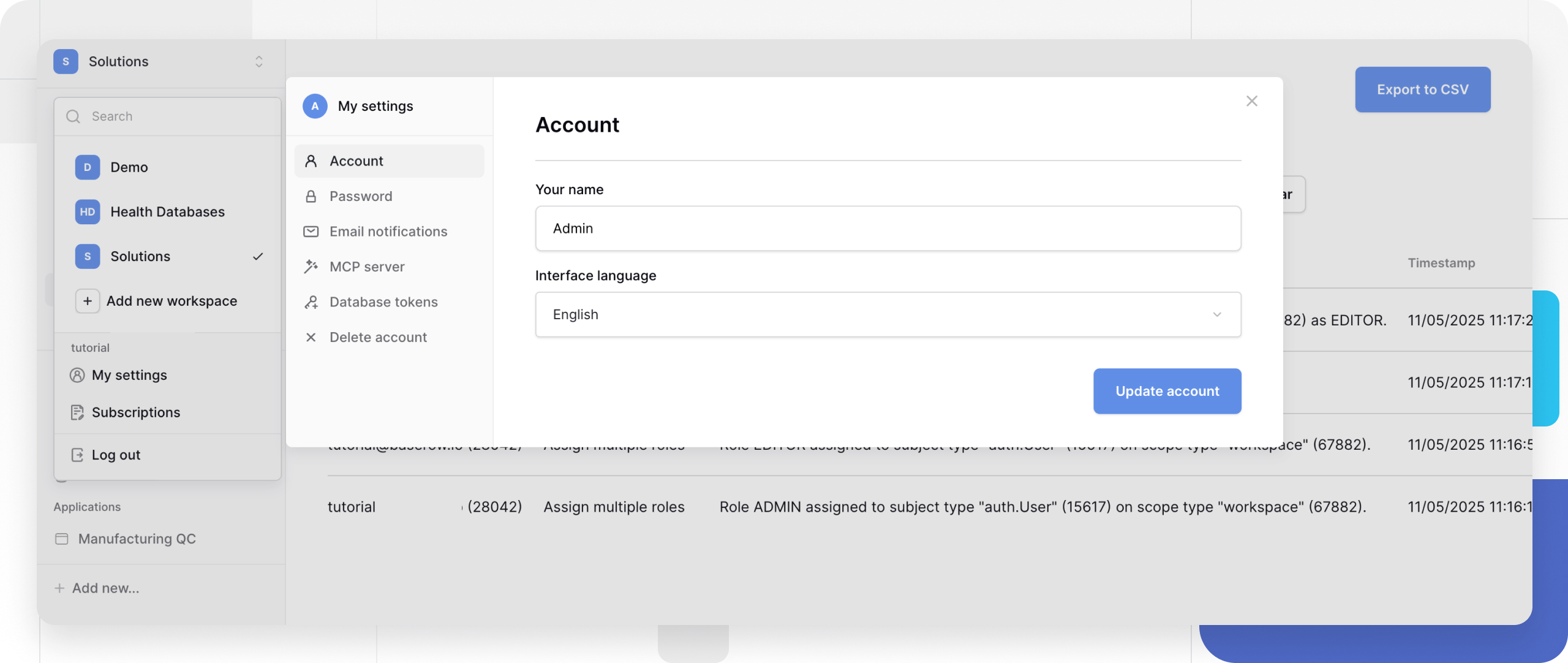
How to Schedule Account Deletion
- Log in to the Baserow account.
- Click the workspace icon in the top-right corner.
- Select My settings from the dropdown.
- Scroll to the bottom of the settings sidebar.
- Click Delete account.
- Review the warning: it lists which workspaces will be deleted (the account is the sole admin) separately from which ones the account will only be removed from (other admins exist there).
- Click Delete account again to confirm.
The Grace Period Before Permanent Deletion
Once deletion is scheduled, the account enters a 30-day grace period by default, and data is only removed for good once that window closes.
During the grace period:
- the account stays fully accessible - logging in works as usual;
- all data remains intact and unchanged;
- database tokens keep working, so API access through them is unaffected;
- workspaces continue functioning normally;
- deletion can be canceled by simply logging in.
After the grace period ends:
- the account is deleted automatically and permanently;
- every workspace where the account was the sole admin is deleted for good;
- none of that data can be recovered afterward;
- the account is removed from every workspace that had other admins.
Canceling a Scheduled Deletion
Changing course during the grace period only takes logging back in to Baserow - doing so automatically cancels the scheduled deletion and fully restores the account, with no extra steps needed.
API Access During the Grace Period
Database tokens stay active for the entire grace period - scheduling deletion by itself does not cut off API access. To close that access right away instead of waiting out the 30 days, revoke the tokens beforehand:
- Before scheduling deletion, open the account settings and go to the Database tokens tab.
- Delete every database token - see Personal API Tokens in Baserow for how creating and revoking them works.
- Only then schedule the account deletion.
That way external scripts and integrations lose access immediately, even while the account technically still exists.
What Happens to Workspaces
The deletion warning shows exactly which workspaces are affected because the account is their only admin.
Workspaces where the account is the sole admin. These are deleted entirely along with the account: every database, table, and row is gone for good, and every other member instantly loses access. To avoid that outcome, hand off the admin role to another member ahead of time, as covered in Setting Up a Workspace . If a workspace simply is not needed personally but should stay with the team, consider leaving the workspace after transferring the admin role instead of deleting the account.
Workspaces with other admins. The account is only removed from these: the workspace keeps operating normally, the remaining members keep full access, and any prior contributions - data changes, comments - stay in place.
Before Deleting an Account
Deletion becomes irreversible once the grace period ends, so it is worth running through a short checklist first:
- Export anything important. Download the relevant databases or individual tables through workspace export or table export .
- Hand off the admin role. If the account is the sole admin of a workspace others still rely on, assign a new admin before scheduling deletion.
- Revoke API tokens. Delete database tokens if outside scripts and integrations need to lose access immediately rather than waiting for the grace period to end.
- Remove sensitive data. Anything in tables or attached files that should not linger even during the grace period is worth deleting separately beforehand.
- Notify the team. Let workspace collaborators know the account is going away and coordinate the handover ahead of time.
What Gets Deleted
The account’s own data. The user profile and login credentials, personal account settings, every database token, email notification preferences, and account activity history.
Workspaces where the account was the sole admin. The entire workspace is removed: every database inside it, every table, field, and row, all files and attachments, and every view’s filter and sort configuration.
What survives when other admins exist. The workspace itself keeps running as before, changes and comments stay in place and remain attributed to the original author, and the account is simply no longer listed as a member.
Frequently Asked Questions
Can a deleted account be recovered afterward? No. Once the grace period ends, deletion is permanent, and neither the account holder nor Baserow support can bring the data back. The only way to recover is logging in before the grace period runs out, which cancels the deletion automatically.
What if deletion was scheduled by accident? There is a default 30-day window to cancel it - logging back in is all that takes. Catching the mistake early and logging in right away is the safest path.
Can an account be deleted if it is the sole admin of shared workspaces? Yes, but those workspaces are deleted along with it. If other people still need access afterward, hand the admin role to one of them before scheduling deletion.
What happens to comments left in workspaces the account did not own? Comments and activity history stay in whichever workspace they were made in, with their content preserved unchanged.
How can specific data be removed without deleting the whole account? Deleting a single workspace, database, table, or row does not require deleting the account - each of those has its own deletion and recovery flow, covered in Data Management .
Can other workspace admins block an account from being deleted? No, account deletion is a personal decision that admins of other workspaces cannot prevent. But if the account is the sole admin of shared workspaces, coordinating a handover beforehand keeps the team from losing access unexpectedly.
After Account Deletion
Once the grace period ends and the account is permanently gone: a new account can be created with the same email address, but it will have no connection to the deleted one. Workspaces that were deleted because the account was their sole admin cannot be recovered, even with a new account. Access to workspaces that had other admins is lost too - regaining it requires one of the remaining admins to invite the new account. A new account starts with an empty set of workspaces, so anything still needed from before has to be recreated or imported again.
Next, read Data Management to see how individual rows, tables, and databases can be recovered or permanently removed without touching the account itself.