Delete a Baserow Database - Undo and Trash Recovery
Deleting a database in Baserow is guarded by two safety nets: a five-second undo right after deletion, and trash recovery during a grace period afterward - once that period ends, the deletion becomes permanent.
What Happens When You Delete a Database
A deleted database disappears from the workspace sidebar, and every collaborator loses access right away. It doesn’t vanish instantly, though: it first moves to the trash, and a five-second undo window is available immediately after deletion.
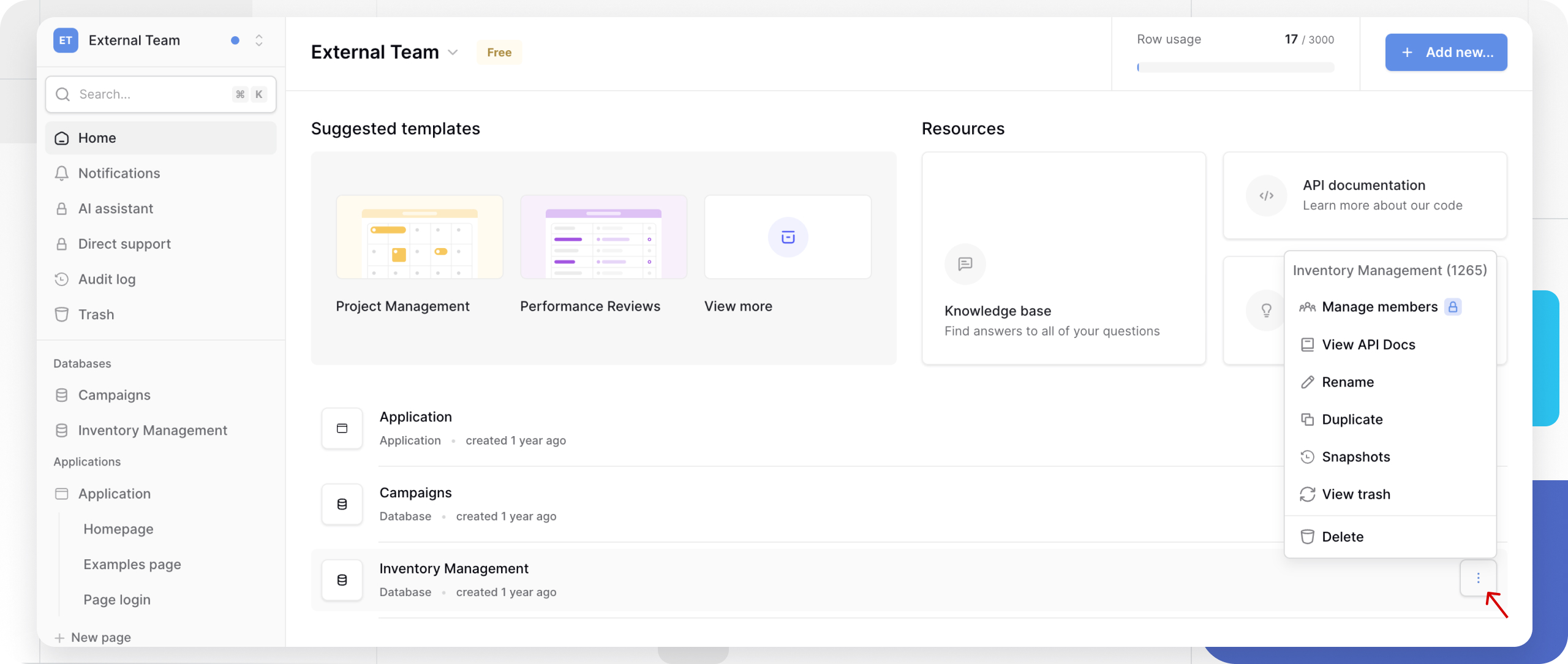
How to Delete a Database
- Find the database on the workspace home page.
- Click the three-dot
⋮icon next to the database name. - Select Delete from the menu.
- Confirm the deletion in the dialog box.
What Happens at Each Stage
Right after deletion, the database disappears from the sidebar, every workspace member loses access, and the database moves to the trash for the grace period. During that time the data is preserved but inaccessible, storage space stays allocated, and any workspace member with sufficient permissions can restore it. Once the grace period ends, the database along with all its tables, rows, and uploaded files is permanently removed, and the storage space is freed.
How to Recover a Deleted Database
Instant undo (first 5 seconds). Right after deletion, a notification appears in the bottom-right corner with a “Restore application” button - click it to bring the database back with no side effects. This is the fastest recovery option, and the database never really reaches the trash.
Trash recovery. If you miss the five-second window, the database can still be restored from the trash - the grace period starts the moment you delete it, and once it ends, restoration is no longer possible.
Alternatives to Deleting
Before deleting a database, consider a softer option:
| Situation | Alternative | Why |
|---|---|---|
| You just want out of a project | Leave a workspace | The database stays active for everyone else |
| Testing risky changes | Duplicate the database | Test on a copy, keep the original untouched |
| Archiving an old project | Export the database , then delete | Keeps an offline copy for later |
| You only need the table structure | Duplicate, then clear the data | Reuse the structure for a new project |
Frequently Asked Questions
What’s the difference between undo and trash recovery? Undo instantly restores the database as if the deletion never happened, without interrupting collaborators who had it open - but it’s only available right after deletion. Trash recovery still works once the undo window has closed, as long as the grace period hasn’t ended.
Can another workspace member restore a database I deleted? Yes, any member with sufficient permissions can restore it from the trash during the grace period - deletion affects the whole workspace, so recovery isn’t limited to the person who deleted it.
What happens to collaborators when a database is deleted? Everyone loses access immediately; anyone who had it open sees an error message and gets redirected to the workspace page. Restoring from the trash brings access back for everyone automatically.
Can a database be recovered after the grace period ends? No, past that point the database is permanently deleted and can’t be recovered - which is why it’s worth exporting important databases ahead of time.
This is the last article in the Database Builder section - next, read Tables to see how a table is structured inside a database and how to work with it.