Baserow and n8n Integration - Node Setup, Auth, and REST API
Automation platform n8n ships an official Baserow node that gives no-code access to hundreds of connected apps: without writing code, a workflow can create, read, update, and delete table rows, and it can fire on a schedule or in response to a webhook from a data change.
Overview
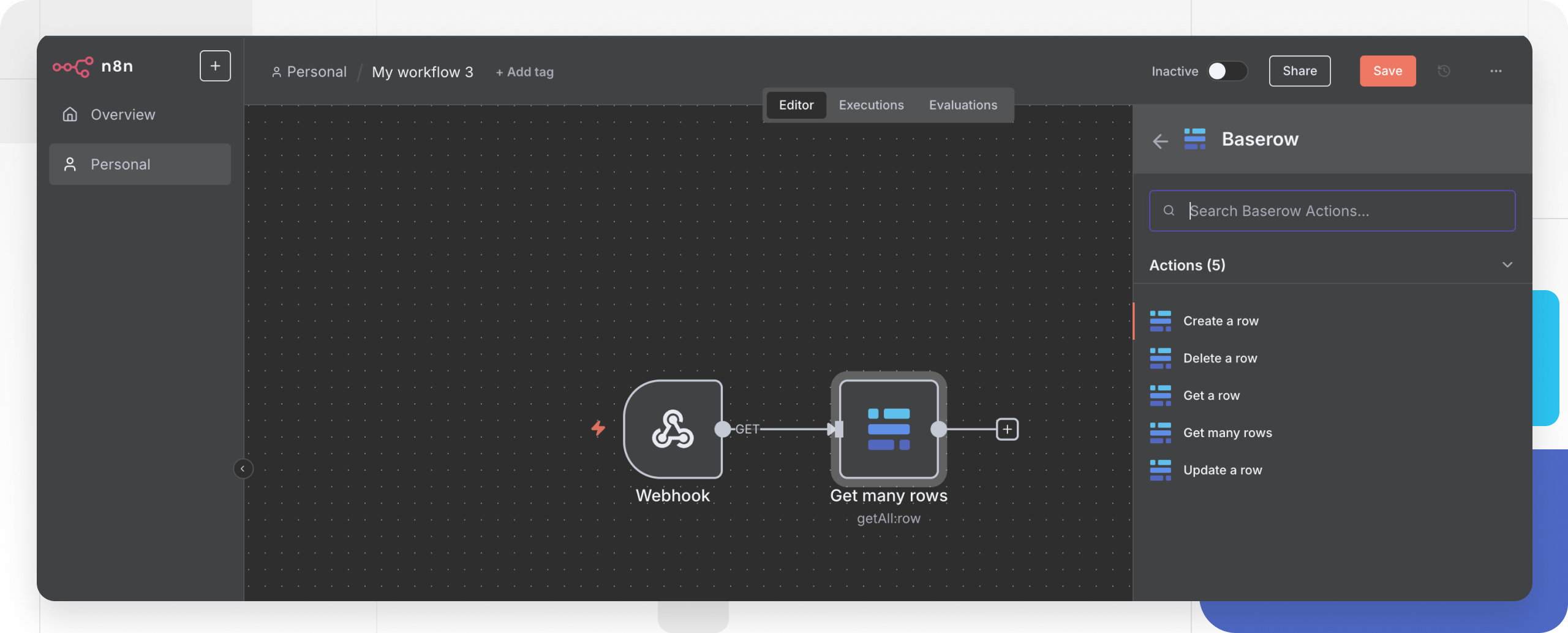
The Baserow node in n8n is a visual front end for the database REST API - instead of crafting HTTP requests by hand, a user drags the node onto the canvas and configures it through a form. That makes it a good fit for syncing data between systems, processing form submissions, generating reports, and reacting to table changes.
Before you start
- A Baserow account (cloud-hosted or self-hosted).
- An n8n account, cloud or self-hosted.
- Baserow login credentials, or a database token created ahead of time.
- The table IDs for whatever needs automating - visible in the Database API documentation for that database.
Supported operations
The Baserow node exposes five row-level operations.
| Operation | What it does | Typical use |
|---|---|---|
| Create a row | Adds a new row to a table | Save form submissions, add CRM contacts |
| Get a row | Retrieves a single row by ID | Look up a customer record |
| Get many rows | Retrieves a filtered set of rows | Build reports, export data |
| Update a row | Modifies an existing row | Update an order status, edit a contact |
| Delete a row | Removes a row | Clean up test data, archive old records |
Authenticating Baserow in n8n
The node supports two connection methods, both configured once as reusable credentials.
Database token. Create a database token
from Baserow’s workspace settings and paste it into the Database Token field when adding the credential in n8n. This is the recommended route: a token can be scoped to a single workspace and revoked on its own, without touching the account password.
Username and password. The Basic Auth option authenticates with the Baserow account’s email and password directly. It is quicker to set up, but a token is the better choice once credentials get shared across several workflows or integrations.
The setup steps are the same either way:
- In n8n, click + Create and choose Credential.
- Search the credential type list for Baserow API and click Continue.
- Set the Host URL:
https://api.baserow.iofor Baserow’s cloud service, or the API address of a self-hosted instance. - Pick an authentication method and fill in either
Database TokenorUsernameandPassword. - Click Save - n8n validates the connection automatically.
Keeping separate credentials for production and development environments makes workflows easier to reason about.
Creating a row in Baserow from n8n
This walks through adding data to a Baserow table from an n8n workflow.
- Drag the Baserow node onto the canvas and connect it to a trigger node (webhook, schedule, or similar).
- Set Operation to Create and select the saved Baserow credentials.
- Enter the Table ID - visible in the auto-generated Database API documentation - and fill in the field values, mapping data from earlier nodes where needed.
- Click Execute Node to test the row creation, then activate the workflow.
Common automation patterns
- CRM synchronization. Keep customer records aligned between Baserow and a CRM - a change in one system propagates automatically to the other.
- Form processing. Capture form submissions, validate the data, and save it into a Baserow table, sending an email notification for each new entry.
- Scheduled reporting. Query Baserow data on a timer, format it into a report, and deliver it by email or chat - handy for a weekly summary.
- Webhook-triggered workflows. Point a Baserow webhook at row changes so n8n starts a workflow the moment new data lands.
- Backend for a mobile app. Read and write Baserow rows from an n8n workflow instead of standing up a dedicated server for that logic.
Frequently asked questions
How is n8n different from calling the Database API directly? The Database API requires writing code to issue HTTP requests. The n8n node gives a visual interface instead - a workflow is assembled by dragging blocks together. Reach for n8n for no-code automation, and the REST API directly when building a custom application.
Does the node work with a self-hosted Baserow instance? Yes. Swap the Host URL from https://api.baserow.io to the self-hosted instance’s API address when setting up the credential - both editions support the same set of operations.
Where do I find a table’s ID? Open the database in Baserow, click the three-dot menu, and open the API documentation entry - it lists every table’s ID, field names, and available endpoints.
Do I need separate credentials per database? No. One set of Baserow credentials in n8n grants access to every database and table in the workspace; the specific table is chosen when configuring each node.
Can n8n handle large data transfers from Baserow? Yes, with pagination. The Get many operation supports pagination parameters, and splitting bulk operations into smaller batches helps avoid timeouts.
Next, read Baserow and ToolJet Integration to connect a low-code interface builder to Baserow tables through the same REST API.