Baserow Tally Integration - Capture Forms via Webhook
Connecting Tally to Baserow means every form submission triggers an automation that receives an HTTP POST request with JSON data over a webhook, then a Create Row action maps the submitted fields onto table columns - this guide walks through configuring both sides and covers a direct REST API alternative for cases that need custom logic.
How It Works
The integration follows a three-step process:
- Trigger (Tally): a form submission sends an HTTP POST request with a JSON payload.
- Listener (Baserow): the webhook URL receives that request.
- Action (Baserow): the JSON data maps to database columns.
Part 1: Baserow Listener Setup
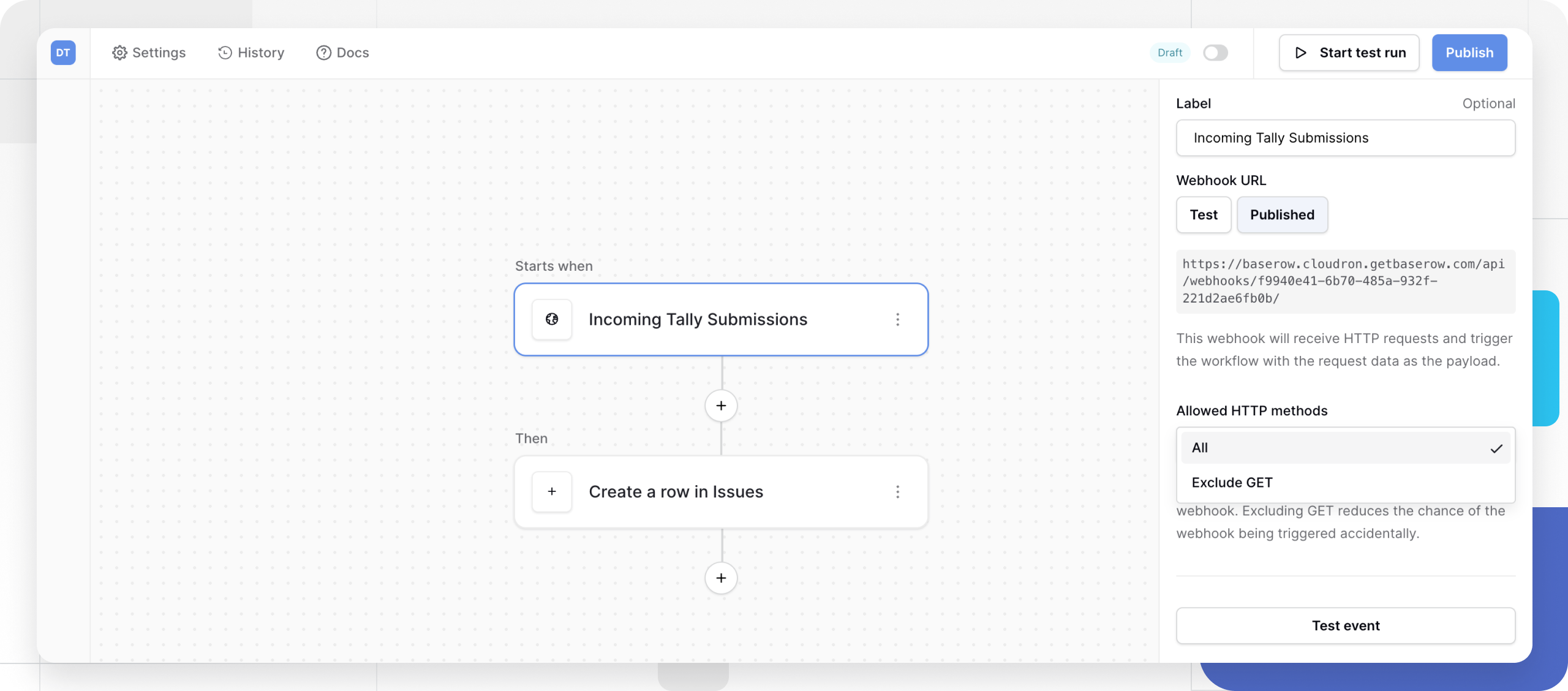
Create the webhook receiver:
- Navigate to the Automations tab in the target Baserow table.
- Create a new workflow.
- Select the “Receive an HTTP request (webhook)” trigger.
- Set a label (for example, “Incoming Tally Submissions”).
- Select POST as the allowed HTTP method.
- Copy the generated webhook URL.
Part 2: Tally Webhook Configuration
Configure Tally to send data:
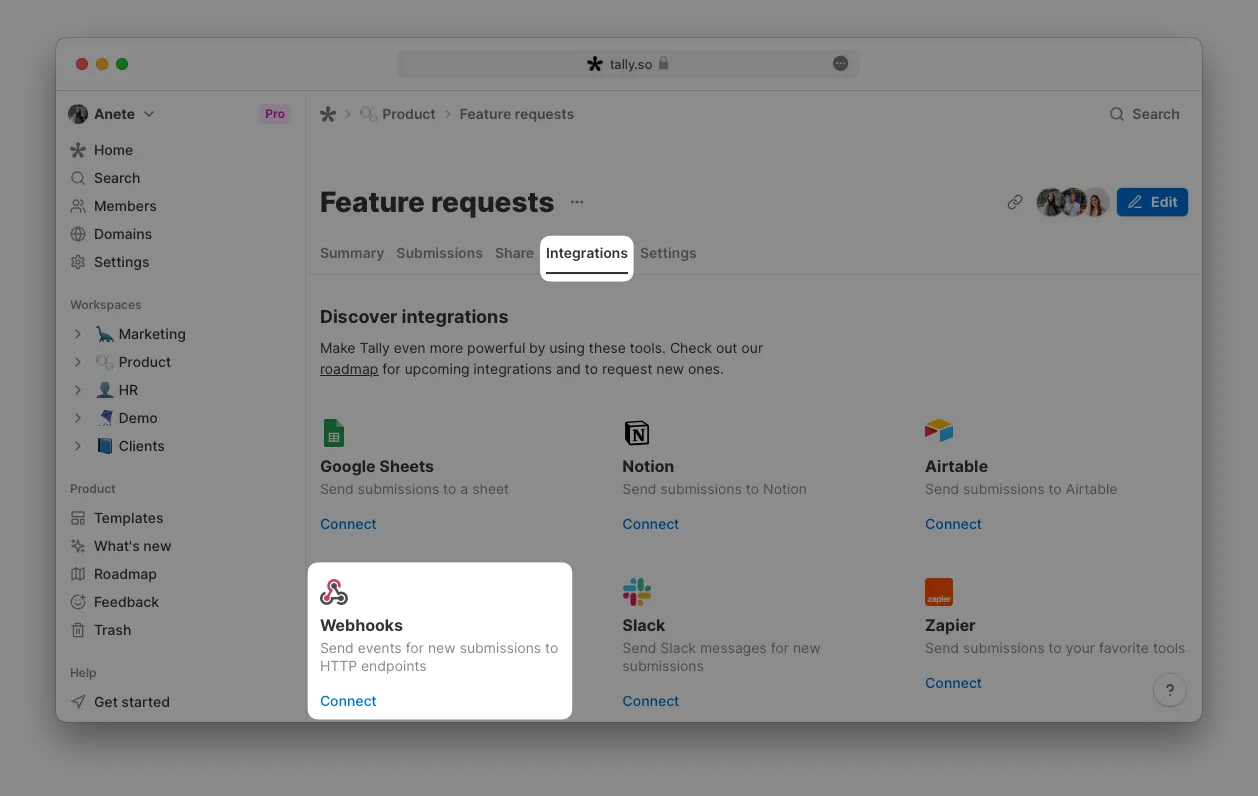
- Open the published Tally form and go to the Integrations tab.
- Select Connect to Webhooks.
- Paste Baserow’s webhook URL into the Endpoint URL field.
- Optionally add a signing secret for security (generates a SHA256 hash in the Tally-Signature header).
- Save the integration.
Part 3: Mapping the Data
Step 1: Capture Sample Data
Submit a test response through the Tally form. Click “Test event” in the Baserow automation builder. A typical JSON structure looks like this:
{
  "data": {
    "formName": "Customer Feedback",
    "fields": [
      { "label": "Full Name", "value": "Jane Doe" },
      { "label": "Email", "value": "jane@example.com" }
    ]
  }
}
Step 2: Create the Row Action
Add a “Create Row” action:
- Select the target table.
- Use the blue “+” icon to map Tally JSON fields to Baserow columns.
- Example: map
fields[0].valueto the Name column.
Alternative: Direct API Method
Use a serverless function or middleware as a bridge between the two systems.
Tally API: REST-based, HTTPS only, base URL https://api.tally.so.
Baserow API call example:
curl -X POST "https://api.baserow.io/api/database/rows/table/{table_id}/?user_field_names=true" \
  -H "Authorization: Token YOUR_DATABASE_TOKEN" \
  -H "Content-Type: application/json" \
  -d '{"Full Name": "Jane Doe", "Email": "jane@example.com"}'
YOUR_DATABASE_TOKEN is a Baserow database (API) token
used in place of personal login credentials.
Comparison
- Baserow Automations: a no-code solution that handles parsing inside the UI.
- Direct API: better suited for complex logic that needs data transformation before storage.
Practical Scenario: Handling Incoming Submissions at Scale
Benefits of the webhook integration:
- Stability: Tally retries failed requests (after 5 minutes, 30 minutes, and up to a day).
- Efficiency: avoids the rate limits that come with polling an API (100 requests per minute).
- Automation: triggers secondary actions such as Slack notifications or CRM updates.
Frequently Asked Questions
Does receiving the webhook require a separate server? No - the Baserow automation itself provides the webhook URL, so no extra server is needed. For more on how webhooks work in general, see Webhooks in Baserow .
What happens if the Tally form’s structure changes? Update the field mapping in the Create Row action manually - there is no automatic remapping when a form changes, so send a fresh test event after editing the form.
Does this approach work with forms other than Tally? Yes - any service that can send an HTTP POST request with JSON can work with the Baserow listener the same way; the trigger-listener-action pattern is not specific to Tally.
Related reading: the Baserow REST API overview for direct calls without webhooks, and Power Automate integration as an alternative way to connect forms and tables.