How to Find Your Baserow Database and Table ID for API
Every call to Baserow’s REST API and every webhook is addressed by a numeric database or table ID rather than by name - this article covers every way to find that number, from the browser address bar to the table’s settings menu, the token settings page, and the auto-generated API documentation.
What Database and Table IDs Are
Database and table IDs are unique numeric identifiers Baserow assigns to every database and to every table inside it. These numbers serve as precise references when working with the Baserow REST API , setting up webhooks , or connecting third-party integrations such as Zapier, Make, or n8n.
Unlike names, which can be changed at any time, IDs stay constant for the entire lifetime of a database or table - which makes them reliable references for automation and integration work.
How to Find a Database ID
There are a few ways to locate a database ID in Baserow.
Method 1: The Browser URL
While viewing any table inside a database, check the browser’s address bar. A self-hosted Baserow instance’s URL follows this pattern:
https://<your-baserow-domain>/database/12345/table/678901/234567In this example, 12345 is the database ID.
Method 2: The Database API Documentation
- Open the database in question.
- Click the
⋮icon next to the database name. - Select View API docs.
- The database ID appears directly in the documentation.
How to Find a Table ID
There are a few ways to locate a table ID in Baserow.
Method 1: Through Database Tokens
- Click the workspace name in the top-left corner.
- Select Settings -> Database tokens.
- Click the relevant token.
- Select Show databases.
- Table IDs are listed next to their table names.
See Personal API Tokens for how to create and scope a token.
Method 2: The Database API Documentation
Just like the database ID, the API documentation lists the IDs of every table inside the database.
- Open the database settings.
- Look for the View API docs link.
- Baserow auto-generates documentation showing every table ID and its field structure.
GET https://<your-baserow-domain>/api/database/tables/database/DATABASE_ID/
Authorization: Token YOUR_API_TOKEN
The response lists every table in the database along with its ID.
Method 3: The Table Options Menu
- Click the
⋮icon next to any table name. - The table ID appears in brackets next to the table name.
- Example: “Customer Data (12345),” where 12345 is the table ID.
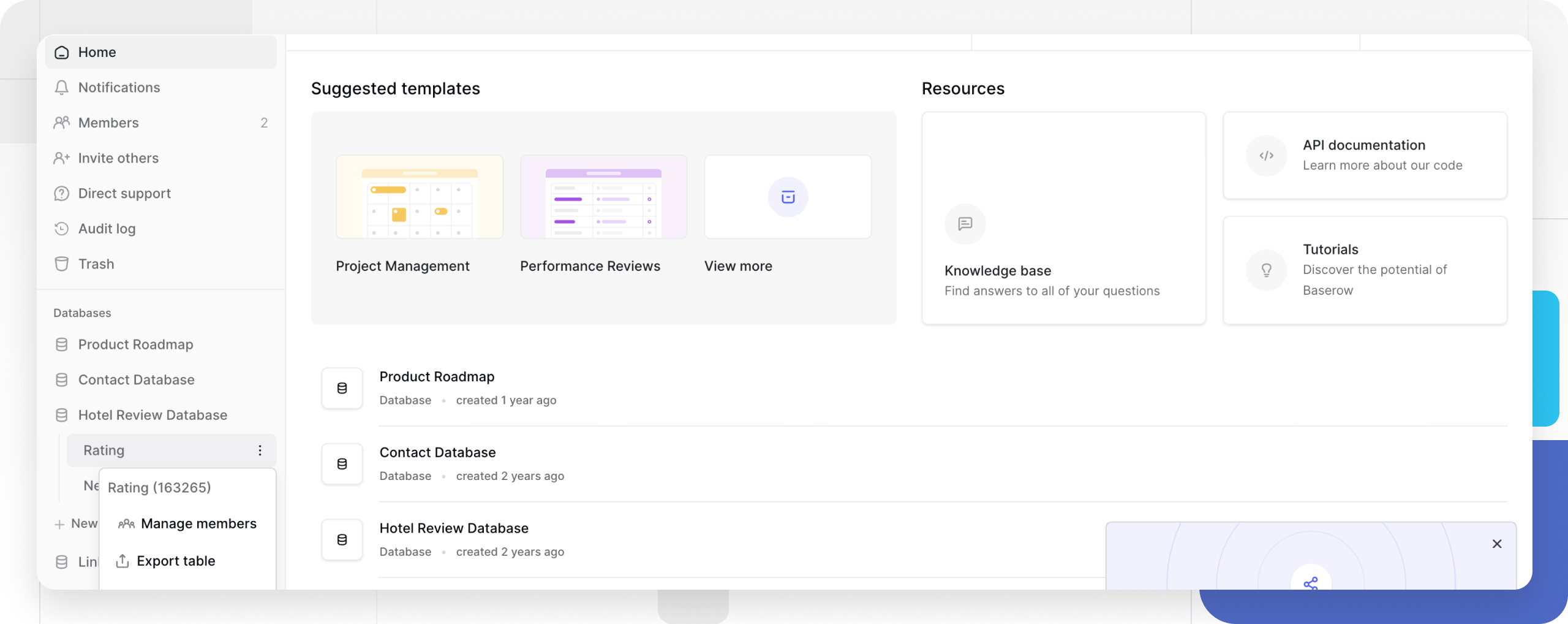
Method 4: The Browser URL
- Open the table that needs to be connected in Baserow.
- Check the browser’s address bar.
- The URL structure is:
https://<your-baserow-domain>/database/DATABASE_ID/table/TABLE_ID/... - Extract the number that follows
/table/.
Example:
URL: https://<your-baserow-domain>/database/456/table/12345/grid
TABLE_ID: 12345
When Database and Table IDs Are Needed
These identifiers typically come up in the following situations:
- API calls to retrieve, create, or update data;
- setting up webhooks that trigger actions when data changes;
- configuring integrations with Zapier, Make, n8n, or other automation tools;
- building custom applications that connect to Baserow data;
- handing a developer access to one specific database or table.
Comparison: Database ID vs. Table ID
| Aspect | Database ID | Table ID |
|---|---|---|
| Scope | The entire database | A single table |
| Use case | Database-level operations | Table-specific operations |
| API endpoints | /api/database/{id}/ | /api/database/{db_id}/table/{table_id}/ |
| Permissions | Database-wide access | Table-specific access |
Frequently Asked Questions
What happens to IDs when a database or table is renamed? Database and table IDs never change, even after a rename. That guarantees integrations and API calls keep working without interruption.
Can the same ID be reused across different Baserow instances? No, IDs are unique within a single Baserow instance. Moving data between different self-hosted installations means the IDs will differ.
Are special permissions needed to view database and table IDs? Read-level access is enough to see an ID. Using that ID in an API call, though, requires whatever permissions the specific operation calls for.
Is there any risk in sharing these IDs with someone else? On their own, database and table IDs do not grant access to any data. Combined with a database token , however, they do open access to that information - share IDs only with trusted parties and always pair them with proper authentication.
Can a custom database or table ID be set? No, Baserow assigns sequential IDs automatically when a database or table is created; these numbers cannot be customized or predicted in advance.
Next, see Baserow REST API for the endpoints, authentication, and request structure behind reading and writing table data over HTTP.