Baserow Database REST API: Endpoints and Request Examples
Baserow generates a REST API - along with matching documentation - for every database automatically, letting scripts and external services read and write rows by authenticating with a database token instead of the web interface; this article covers where to find that documentation, which endpoints exist, and how to format values for each field type.
Overview
Baserow’s API-first approach makes it easy to integrate databases with any application, automate workflows, and build custom solutions without vendor lock-in. The REST API follows standard conventions, uses JSON for data exchange, and returns standard HTTP status codes for clear error handling.
Authentication uses database tokens with granular permissions down to the table level - create, read, update, and delete access can be controlled per token, which keeps integrations with external applications secure.
The API documentation updates automatically whenever the database schema changes, so integration code stays in sync with the current data structure.
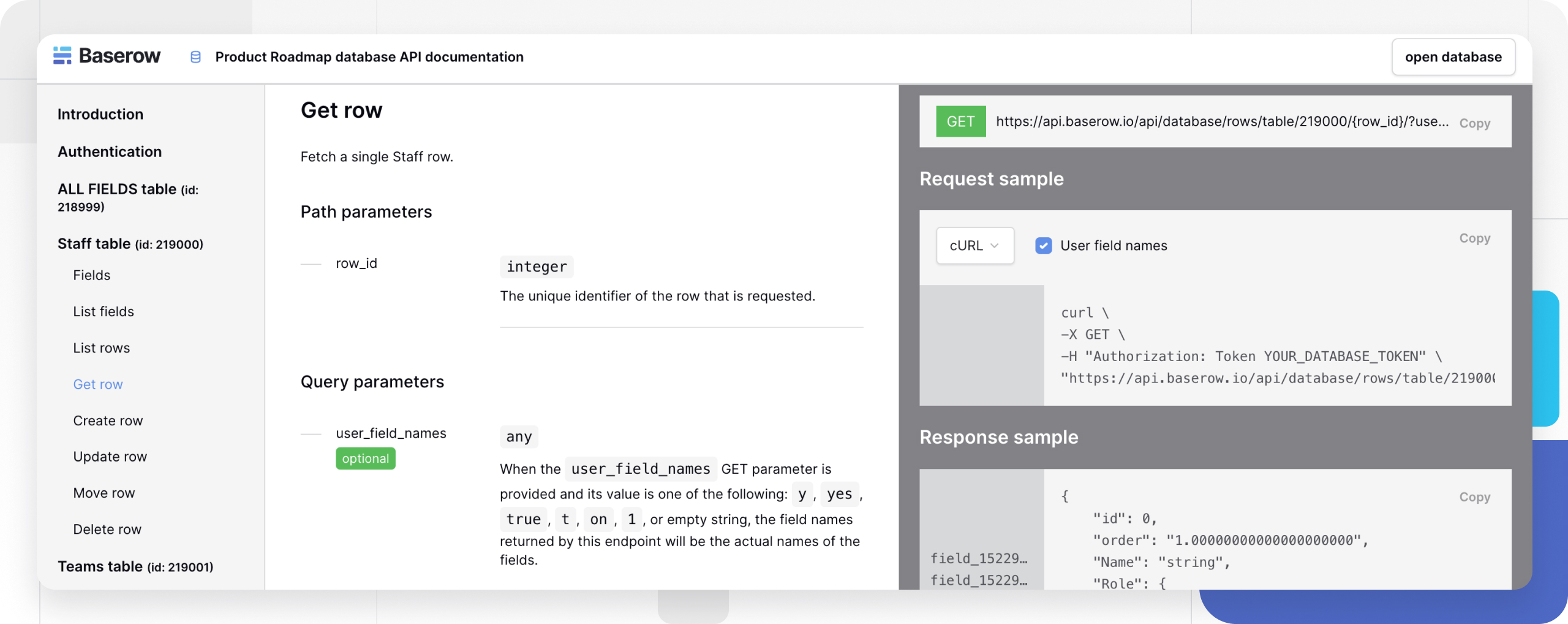
Access the Database API Documentation
- Click the
⋮icon next to the database name. - Select View API Docs from the menu.
- Review the auto-generated endpoints specific to the schema.
- Make the first API call.
curl \
-X GET \
-H "Authorization: Token YOUR_DATABASE_TOKEN" \
"https://api.baserow.io/api/database/fields/table/TABLE_ID/"
See Personal API Tokens for how to generate a database token for a workspace.
Core API Endpoints
Test endpoints with tools like curl or Postman.
| Operation | Method | Endpoint | Description |
|---|---|---|---|
| List tables | GET | /api/database/tables/all-tables/ | Get all tables in a workspace |
| List fields | GET | /api/database/fields/table/{table_id}/ | Get the field schema for a table |
| List rows | GET | /api/database/rows/table/{table_id}/ | Get all rows with filtering and pagination |
| Get row | GET | /api/database/rows/table/{table_id}/{row_id}/ | Get a specific row by ID |
| Create row | POST | /api/database/rows/table/{table_id}/ | Add a new row to a table |
| Update row | PATCH | /api/database/rows/table/{table_id}/{row_id}/ | Modify an existing row |
| Move row | PATCH | /api/database/rows/table/{table_id}/{row_id}/move/ | Change a row’s position |
| Delete row | DELETE | /api/database/rows/table/{table_id}/{row_id}/ | Remove a row from a table |
Anatomy of a Baserow API Endpoint
https://api.baserow.io/api/database/rows/table/TABLE_ID/?user_field_names=true| Component | Description | Example |
|---|---|---|
| Base URL | Baserow API server | https://api.baserow.io (Cloud), https://your-domain.com (self-hosted) |
| API path | Endpoint structure | /api/database/rows/table/ |
| TABLE_ID | Unique identifier for the table | 12345 |
| Parameters | Query string options | ?user_field_names=true |
Authentication
Baserow uses token authentication for API access. Tokens are scoped to specific databases and tables, and create, read, update, and delete permissions can be set per table - grant only the table permissions a token actually needs rather than full database access.
Every API request must use HTTPS and include the database token in the Authorization header.
Authorization: Token YOUR_DATABASE_TOKENTokens can be revoked at any time from account settings.
Store tokens in environment variables rather than in code, and rotate them regularly.
Rate Limits
Cloud version: Baserow Cloud limits requests to 10 concurrent API calls. This limit is subject to a fair use policy and may be lowered if it affects overall performance.
Self-hosted: no rate limits apply.
Working with Field Types
Different field types expect specific data formats when creating or updating rows.
Text and Numeric Fields
{
  "Name": "John Doe",
  "Age": 25,
  "Email": "john@example.com"
}
Select Fields
Provide either the option names or their internal IDs.
Single select. Accepts an integer or a text value representing the chosen option’s ID or value. A null value means nothing is selected; for a text value, the first matching option is used.
{
    "Timezone": {
        "id": 1,
        "value": "Option",
        "color": "light-blue"
    }
}
Multiple select. Accepts an array of integers or text values, each representing a chosen option’s ID or value; for a text value, the first matching option is used. A comma-separated string of names can be sent instead - it is converted into an array of option names automatically.
{
    "Team": [
        {
            "id": 1,
            "value": "Option",
            "color": "light-blue"
        }
    ]
}
Link to Table Fields
Accepts an array of identifiers or primary field values from the related table’s rows - every relation must be listed on each update, and an empty array clears all relations. When a text value is sent instead of an ID, Baserow searches for a row whose primary field matches it; if more than one row matches, the first one in table order is used. A comma-separated string of names works as well, and a bare row ID can be sent without wrapping it in an object.
{
     "Customer": [
        {
            "id": 0,
            "value": "string"
        }
    ]
}
Date and Boolean Fields
{
  "Created": "2024-01-15T10:30:00Z",
  "IsActive": true
}
Error Handling
Baserow uses standard HTTP status codes with detailed error messages - build proper error handling and retry logic into any integration.
Common status codes:
| Error code | Name | Description |
|---|---|---|
| 200 | Ok | Request completed successfully |
| 400 | Bad request | The request contains invalid values, or the JSON could not be parsed |
| 401 | Unauthorized | The endpoint was accessed without a valid database token |
| 404 | Not found | The row or table was not found |
| 413 | Request Entity Too Large | The request exceeded the maximum allowed payload size |
| 500 | Internal Server Error | The server encountered an unexpected condition |
| 502 | Bad gateway | Baserow is restarting, or an unexpected outage is in progress |
| 503 | Service unavailable | The server could not process the request in time |
Error response format:
{
    "error": "ERROR_NO_PERMISSION_TO_TABLE",
    "description": "The token does not have permissions to the table."
}
Filtering and Pagination
Query parameters available when listing rows.
Filtering:
filters- a JSON object with filter conditions; rows can be filtered using the same conditions available in views.filter_type-ANDorORwhen combining multiple filters; only matters with two or more filters.search- a full-text search across all fields; only rows whose data matches the query are returned.
Sorting:
order_by- the field name to sort by; by default, or when prefixed with+, sorting is ascending (A-Z), while a-prefix sorts descending (Z-A).
Pagination. Use pagination for large datasets.
size- rows per page (default 100, maximum 200).page- the page number, starting at 1.
GET /api/database/rows/table/123/?filters={"Status":"Active"}&order_by=-Created&size=50&page=2OpenAPI Specification
The OpenAPI spec includes detailed parameter descriptions and request and response examples, and it can be imported into API testing tools like Postman or Insomnia.
Access the complete API specification here:
- Interactive docs: https://api.baserow.io/api/redoc/
- JSON schema: https://api.baserow.io/api/schema.json
Webhooks Integration
Combine API calls with webhooks for real-time data synchronization: webhooks notify an application when data changes, while API calls query and update data programmatically - together they form a bidirectional integration workflow. See Baserow Webhooks for the underlying mechanics.
Frequently Asked Questions
How do I find my table and database IDs? They are visible in the browser URL when viewing a table, and they can also be retrieved through the list tables endpoint. See Database and Table ID for details.
Can I use the API without creating an account? No, every API endpoint requires authentication with a database token, which in turn requires a Baserow account and access to the relevant database.
What happens when I change my database schema? The API documentation updates automatically to reflect the new schema, but client code may still need updating if field names, types, or table structures change. Cache table schema information where possible.
How do I handle API rate limits? Cloud users should build retry logic with exponential backoff; self-hosted instances have no rate limits. Watch the response headers for rate limit status.
Can I bulk create or update multiple rows? The standard API creates or updates one row per request - for bulk operations, issue multiple sequential API calls.
How do I debug API authentication issues? Verify the token is correct, has the right permissions for the table, and is sent in the Authorization header as Token YOUR_DATABASE_TOKEN; also double-check that the database and table IDs are accurate.
Next, read Database and Table ID
to find the database_id and table_id values that plug into the REST API endpoints above.