Baserow Webhooks: Events, Payload, and Retry Setup
A Baserow webhook is an HTTP request the database fires on its own whenever a row, view, or field event happens - a row gets created, updated, or deleted, or a view or field is added, changed, or removed - so an external service is notified the instant something changes, with the full details in the request body, instead of polling the API on a schedule.
What Are Baserow Webhooks
Webhooks are automated notifications that Baserow sends to external applications whenever specific events happen in a database. Instead of an external system constantly checking for changes, Baserow pushes the update to it in real time.
Whenever data is created, updated, or deleted in Baserow, a webhook instantly notifies the chosen endpoint with detailed information about what changed. That makes it possible to build integrations with other tools, automated workflows, and real-time data synchronization without repeatedly polling the database REST API .
Baserow’s own documentation notes that each webhook keeps a queue of up to 5,000 pending calls (a figure given for the hosted cloud edition; the effective limit on a self-hosted instance depends on server configuration) - calls beyond that limit are dropped, and the queue itself is processed one call at a time.
Webhook Event Types
Baserow supports several categories of events to choose from when configuring a webhook.
Row Events
- Rows created - triggers when new rows are added.
- Rows updated - triggers when existing rows are modified.
- Rows deleted - triggers when rows are removed.
View Events
- View created - triggers when a new view is added.
- View updated - triggers when a view’s configuration changes.
- View deleted - triggers when a view is removed.
Field Events
- Field created - triggers when a new field is added.
- Field updated - triggers when a field’s properties change.
- Field deleted - triggers when a field is removed.
Advanced Events
- Conditional row update - triggers only when specific field values change.
- Row enters view - triggers when a row starts matching a view’s filter conditions.
If a webhook still uses the deprecated event types (row.created, row.updated, row.deleted), switch it to the newer batch types (rows.created, rows.updated, rows.deleted) - they perform better under bulk changes.
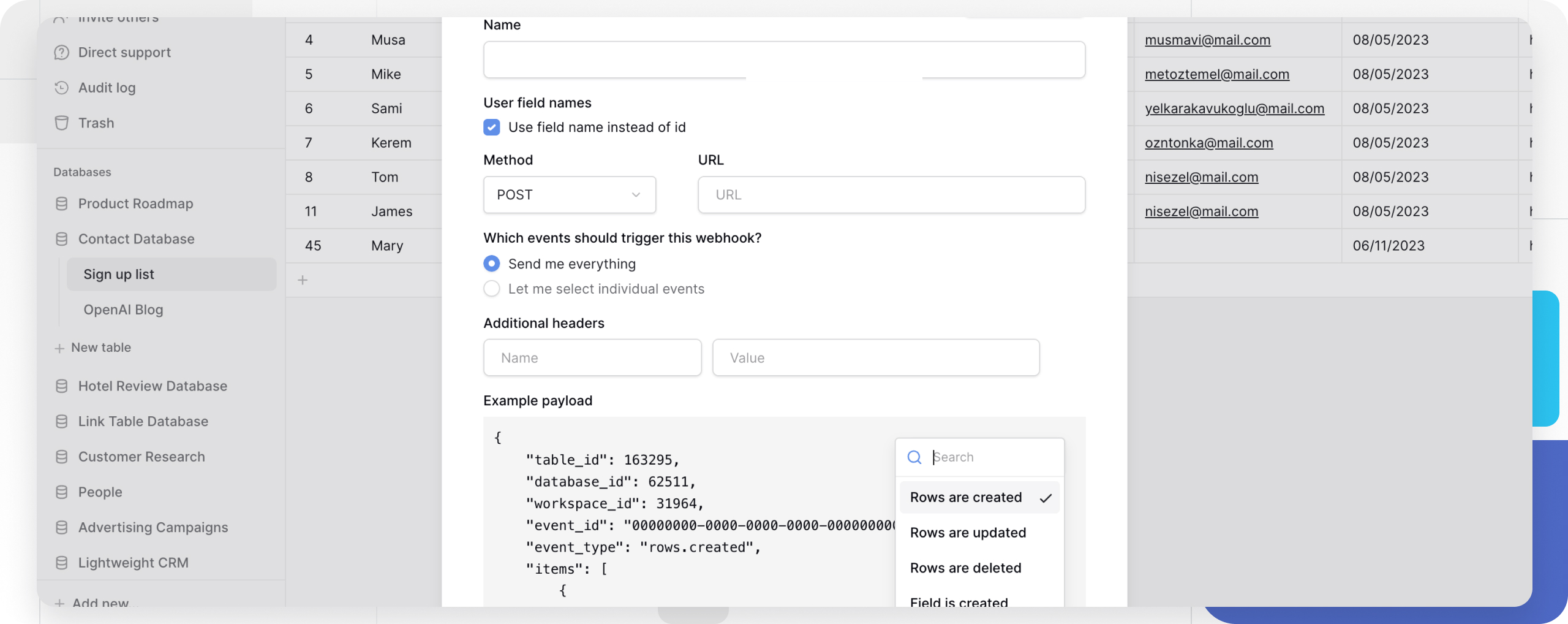
How to Create a Webhook
- Open webhook settings
- Click the
⋮icon next to the table or view name in the sidebar. - Select Webhooks from the menu.
- Click Create webhook +.
- Click the
- Configure basic settings
- Enter a descriptive name for the webhook.
- Choose an HTTP method (GET, POST, PUT, PATCH, DELETE).
- Add the target URL endpoint.
- Select trigger events
- Choose “Send everything” to subscribe to every event.
- Or pick only the specific events that matter.
- Add custom headers (optional)
- Include authentication tokens.
- Set
Content-Typeor other required headers.
- Test the webhook
- Click Trigger test webhook.
- Verify the endpoint receives the test payload.
- Check the response inside Baserow.
- Save and activate
- Click Save to turn the webhook on.
- Confirm it fires correctly with a real action on the table.
Webhook Payload Structure
Baserow sends a structured JSON payload containing the event details and the data of the affected object.
Example payload for a “View created” event:
{
    "table_id": 50000,
    "database_id": 1000,
    "workspace_id": 300,
    "event_id": "00000000-0000-0000-0000-000000000000",
    "event_type": "view.created",
    "view": {
        "id": 0,
        "table_id": 0,
        "name": "View",
        "order": 1,
        "type": "grid",
        "table": null,
        "filter_type": "AND",
        "filters_disabled": false,
        "public_view_has_password": false,
        "show_logo": true,
        "ownership_type": "collaborative",
        "owned_by_id": null,
        "row_identifier_type": "id",
        "public": false
    }
}
Key payload elements:
- Identifiers:
table_id,database_id, andworkspace_idpoint to the source of the event. - Event info:
event_typeandevent_iddescribe what happened. - Data object: carries the full details of the affected row, view, or field.
Managing Webhooks
Edit an Existing Webhook
- Open webhook settings through the table’s
⋮menu. - Click details next to the webhook.
- Select Edit.
- Change the settings as needed.
- Click Save.
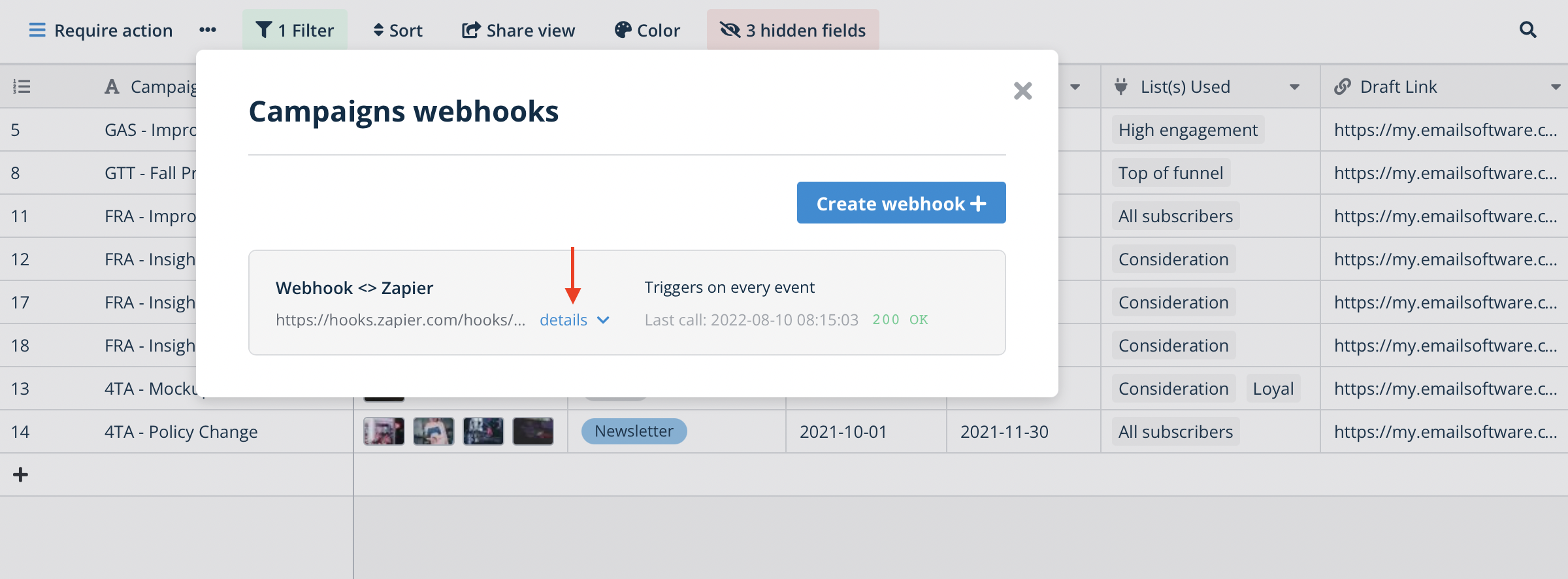
Monitor Webhook Activity
Review the call log to troubleshoot issues:
- Open the webhook’s details.
- Select the Call log tab.
- Inspect the request and response details for each call.
Delete a Webhook
In the webhook’s edit view, click Delete at the bottom. A deleted webhook cannot be restored.
Error Handling and Reliability
Baserow automatically retries failed webhook calls:
- Retry attempts: a limited number of retries for each failed call.
- Success criteria: the endpoint must return a
200 OKstatus. - Best practice: keep the endpoint reliable and able to absorb traffic spikes during bulk data changes.
Frequently Asked Questions
How can I tell which user triggered a webhook event? Add a Last modified by field to the table to include user information in the payload. A webhook sends the complete data of the row that changed, so that field’s value is included automatically and identifies the account responsible for the latest update.
What happens if my webhook endpoint is down? Baserow automatically retries failed calls a limited number of times. Make sure the endpoint returns a 200 OK status and can handle temporary traffic spikes.
Can I filter which rows trigger a webhook? Yes, use a conditional row update webhook so it only fires when specific field values change. A view-based webhook works too - it only fires for rows that match that view’s filters.
How do I troubleshoot a failing webhook? Check the webhook’s call log in Baserow to see the request and response details. Common causes are a wrong URL, missing authentication headers, or an endpoint that doesn’t return 200 OK.
Are there rate limits on webhooks? Baserow doesn’t enforce strict rate limits, but the receiving endpoint still needs to handle the volume of changes in the database. Consider batching operations if many updates happen at once.
Can webhooks work alongside external automation tools? Yes, webhooks integrate cleanly with Zapier , Make , n8n , and other automation platforms - just use the webhook URL the automation tool provides as the endpoint.
Next, read Personal API Tokens to see how to get a token for direct REST API requests without setting up a webhook.