1:1 NAT in pfSense - Static Address Translation Guide
1:1 NAT (one-to-one NAT) in pfSense provides full bidirectional translation between an external and internal IP address. Unlike port forwarding, which translates only specific ports, 1:1 NAT establishes a bijective mapping between addresses: all inbound traffic destined for the external address is redirected to the internal host, and all outbound traffic from that host is translated to the assigned external address. The mechanism is built on BINAT (bidirectional NAT) in the pf packet filter subsystem inherited from OpenBSD.
1:1 NAT is used when an internal server requires full presence on a dedicated public IP address without port restrictions. Typical use cases include mail servers, VPN gateways, SIP servers, and DMZ hosts with dedicated addresses.
Differences from port forwarding
Port forwarding and 1:1 NAT solve a similar problem - providing external access to internal resources - but differ fundamentally in scope.
Port forwarding translates a specific protocol/port pair (or port range). The internal host remains accessible from outside only on the explicitly specified ports. This minimizes the attack surface: the administrator controls exactly which services are exposed.
With 1:1 NAT, the entire address is translated. Access control relies entirely on firewall rules: without restrictive rules on the WAN interface, all ports on the internal host will be accessible from the internet.
| Characteristic | Port forwarding | 1:1 NAT |
|---|---|---|
| Granularity | Specific ports or ranges | All ports and protocols |
| Rules per server | One per service | One rule for the entire host |
| Access control | Built into the NAT rule | Requires separate firewall rules |
| Attack surface | Minimal | Depends on firewall rules |
| VIP required | No (WAN IP can be used) | Yes (dedicated IP required) |
| Outbound address | Translated to WAN IP | Translated to assigned VIP |
| Processing priority | Higher (processed first) | Lower (processed after port forward) |
Warning:
If both a port forward and a 1:1 NAT rule are configured for the same external address, the port forward takes priority for matching ports. Remaining traffic is handled by the 1:1 NAT rule. This must be taken into account when planning the configuration.
When to use 1:1 NAT
1:1 NAT should be used in the following scenarios:
- Dedicated public IP for a server - the server must be accessible on all ports at its own public address (mail server, game server, PBX).
- DMZ with multiple servers - each server in the DMZ receives a separate public IP from a dedicated address block.
- Protocol compatibility - some protocols (SIP, FTP active mode, certain VPN implementations) work incorrectly through port forwarding because they embed IP addresses in the packet payload. 1:1 NAT resolves this by translating the address at all levels.
- Configuration simplification - instead of dozens of port forwarding rules for a single server, one 1:1 NAT rule and a set of firewall rules are created.
- Subnet translation - 1:1 NAT allows translating entire subnets with matching masks (for example,
/28to/28), which is useful when migrating address spaces.
1:1 NAT should not be used when:
- Only one or two ports need to be opened for the server - port forwarding is simpler and more secure.
- The external address is the primary WAN IP and VPN services (OpenVPN, IPsec) running on the firewall require use of the WAN address.
- NAT is needed only for inbound traffic without changing the outbound source address.
Prerequisites
Virtual IP addresses (VIP)
To configure 1:1 NAT with an additional public IP address, a Virtual IP (VIP) must first be created on the WAN interface. The VIP instructs pfSense to accept traffic destined for that additional IP address.
Creating a VIP:
- Navigate to Firewall > Virtual IPs.
- Click Add.
- Configure the parameters:
- Type - IP Alias (for a single address) or Other (for routed subnets).
- Interface - WAN (or the appropriate external interface).
- Address(es) - the public IP address with subnet mask (typically
/32for a single address). - Description - purpose of the address (for example, “Mail server public IP”).
- Click Save, then Apply Changes.
Warning:
The CARP VIP type is used in high availability (HA) configurations. For 1:1 NAT on a standalone firewall, the IP Alias type is recommended. Proxy ARP is also acceptable; however, IP Alias is preferred because it creates the address directly on the interface, ensuring correct operation of services bound to the interface.
Routing
The ISP must route the additional public addresses to the firewall’s WAN interface. Without proper routing from the provider, 1:1 NAT will not function - packets destined for the external address will not reach the firewall.
For routed subnets (/29, /28, etc.) provided by the ISP, the VIP type should be chosen based on the delivery method: IP Alias for addresses in the same subnet as the WAN interface, or Other for addresses routed through a gateway.
Configuring 1:1 NAT
Creating a rule
- Navigate to Firewall > NAT, select the 1:1 tab.
- Click Add to create a new rule.
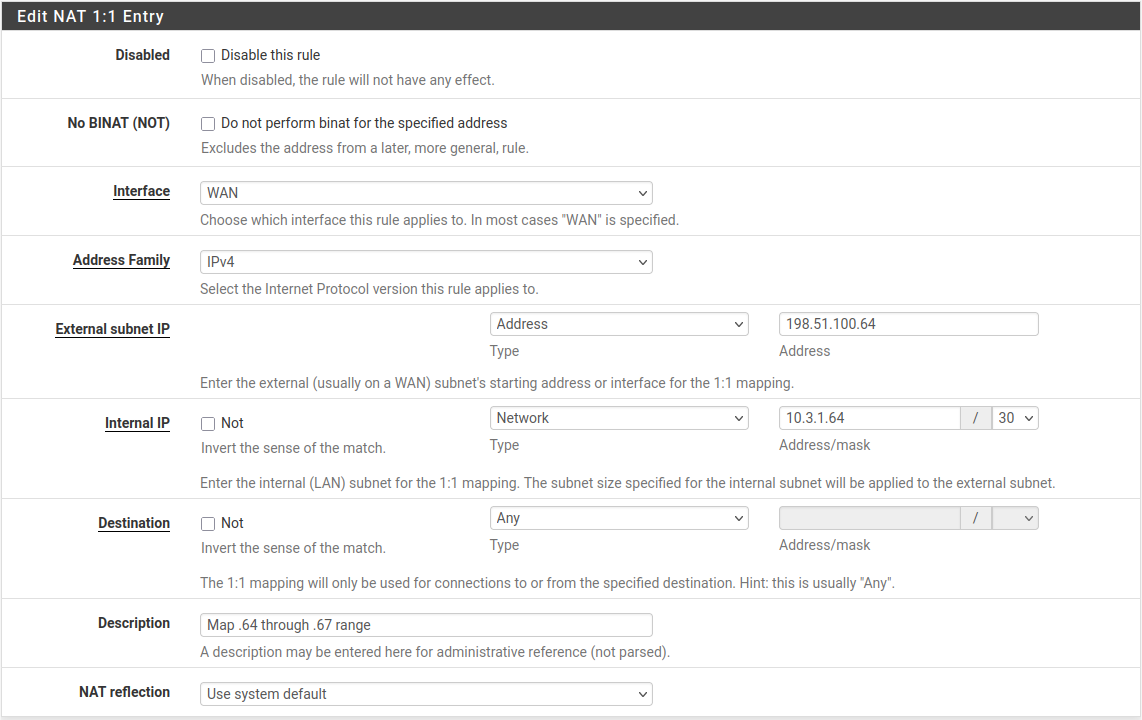
Fig. 1. 1:1 NAT rule list
- Configure the rule parameters:
| Field | Description | Example value |
|---|---|---|
| Interface | External interface receiving traffic | WAN |
| External subnet IP | Public IP address (VIP) assigned for translation | 203.0.113.10 |
| Internal IP | Internal IP address of the target host or subnet with mask | 10.0.1.50 or 10.0.1.0/24 |
| Destination | Restrict translation by destination address (optional) | Any |
| Description | Purpose of the rule | Mail server 1:1 NAT |
| NAT Reflection | NAT reflection mode (use system default or override) | Use system default |
| Negate | Exclude matching traffic from translation (rule inversion) | Unchecked |
- Click Save, then Apply Changes.
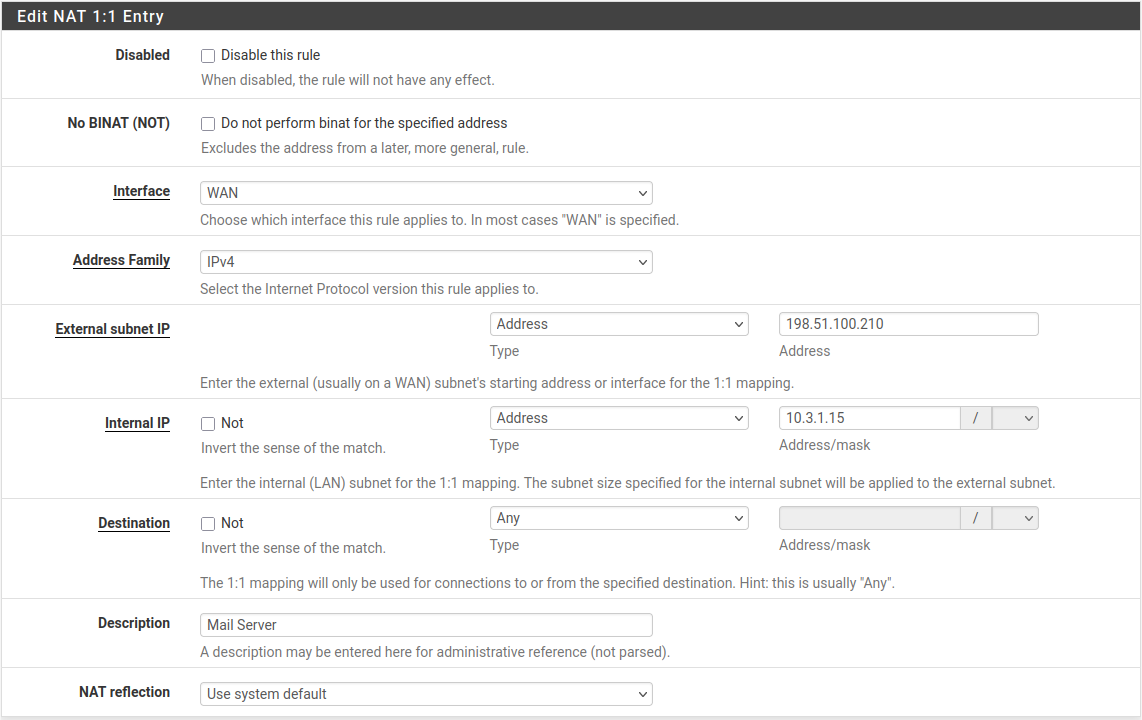
Fig. 2. 1:1 NAT rule editing form
Subnet translation
1:1 NAT supports translating entire subnets provided the masks match. For example, to translate a /28 block:
- External subnet IP -
203.0.113.16/28 - Internal IP -
10.0.1.16/28
In this case, 203.0.113.17 translates to 10.0.1.17, 203.0.113.18 to 10.0.1.18, and so on. The last octets of the addresses match, simplifying documentation and troubleshooting.
Destination restriction
The Destination field allows limiting the scope of 1:1 NAT. By default, translation applies to all traffic (Any). If a specific address or subnet is specified in the Destination field:
- For inbound traffic - translation applies only to packets addressed to the specified internal host/subnet.
- For outbound traffic - source address translation is performed only for packets directed to the specified destination address.
This is useful in scenarios where a server must use different external addresses for traffic to different destinations.
Firewall rules
1:1 NAT does not automatically create firewall rules (unlike port forwarding, which can generate associated rules). After configuring 1:1 NAT, allow rules must be manually created on the WAN interface.
Creating rules for 1:1 NAT
Rules are created on the WAN tab under Firewall > Rules. The destination address should be the internal IP address of the host, because NAT translation occurs before firewall rule processing.
Example rule set for a mail server at 10.0.1.50 with 1:1 NAT:
| Action | Protocol | Source | Destination port | Destination |
|---|---|---|---|---|
| Pass | TCP | Any | 25 (SMTP) | 10.0.1.50 |
| Pass | TCP | Any | 465 (SMTPS) | 10.0.1.50 |
| Pass | TCP | Any | 993 (IMAPS) | 10.0.1.50 |
| Pass | TCP | Any | 443 (HTTPS) | 10.0.1.50 |
Warning:
Do not create an “Allow all” rule on WAN for the 1:1 NAT address. Unlike port forwarding, with 1:1 NAT a permissive rule without port restrictions will expose all ports on the internal server to the internet, including SSH, RDP, databases, and other services not intended for public access.
Common mistakes
- Specifying the external address in the firewall rule - with 1:1 NAT, WAN rules must use the internal IP address in the Destination field, because translation occurs before filtering.
- Missing firewall rules - without explicit allow rules, all inbound traffic is blocked by the implicit deny rule, despite the configured 1:1 NAT.
- Conflict with port forwarding - if a port forward is configured for the same external IP, it will intercept traffic on the specified ports before the 1:1 NAT rule.
Comparison with port forwarding
The choice between 1:1 NAT and port forwarding depends on the requirements of the specific scenario.
| Criterion | 1:1 NAT | Port forwarding |
|---|---|---|
| Open ports | All (restricted by firewall rules) | Only explicitly specified |
| VIP required | Yes | No (WAN IP can be used) |
| Host outbound address | Translated to assigned VIP | Translated to WAN IP (outbound NAT) |
| Configuration complexity | One NAT rule + firewall rules | One NAT rule per port/service |
| Recommended for | Servers with many services, DMZ | Individual services (web, SSH, RDP) |
| Default security posture | Requires careful firewall rule configuration | Limited to specified ports |
| Compatibility with firewall VPN | Limited (cannot use WAN IP) | Full |
| Subnet support | Yes | No |
Recommendation: if fewer than five ports need to be opened for a server and a fixed outbound address is not required, port forwarding is preferable from a security standpoint. For servers with many services or a requirement for a dedicated public address, use 1:1 NAT.
Troubleshooting
1:1 NAT not working
Traffic does not reach the internal server:
- Verify the VIP exists - Firewall > Virtual IPs. Without a VIP, the firewall does not accept traffic on the additional address.
- Verify routing from the ISP - run
pingandtracerouteto the external address from an external host. Packets must reach the firewall’s WAN interface. - Verify WAN firewall rules - confirm that an allow rule exists with the internal IP in the Destination field.
- Check the firewall log - Status > System Logs > Firewall. Blocked packets are displayed with the rule that caused the block.
Server outbound traffic uses the wrong external address:
- Verify that the 1:1 NAT rule has no restrictions in the Destination field if all outbound traffic should be translated.
- Check rule order - 1:1 NAT takes priority over outbound NAT. If an outbound NAT rule processes traffic first, there may be a configuration conflict.
- Verify using an external service (for example,
curl ifconfig.mefrom the server) - the displayed address should match the External subnet IP from the 1:1 NAT rule.
NAT reflection not working:
When accessing the external address from the internal network:
- Check NAT reflection settings in System > Advanced > Firewall & NAT, Network Address Translation section.
- For 1:1 NAT, reflection must be set to NAT + proxy or Pure NAT mode.
- Verify that the 1:1 NAT rule does not have reflection overridden to “Disable”.
Diagnostic commands
# Check if VIP responds to ARP
arping -I em0 203.0.113.10

# Verify NAT translation in packet filter
pfctl -s nat

# Check state table for specific host
pfctl -ss | grep 10.0.1.50

# Test connectivity from WAN perspective
tcpdump -i em0 host 203.0.113.10 -n
Migration from other platforms
Cisco ASA
In Cisco ASA, static translation is configured using the static command (versions before 8.3) or NAT objects (versions 8.3+).
ASA 8.3+ (Object NAT):
object network MAIL-SERVER
 host 10.0.1.50
 nat (DMZ,OUTSIDE) static 203.0.113.10
pfSense equivalent:
- Create a VIP for
203.0.113.10on the WAN interface. - Create a 1:1 NAT rule: External
203.0.113.10, Internal10.0.1.50, Interface WAN. - Create firewall rules on WAN for the permitted ports.
Key difference: in ASA, ACLs are applied to the interface and use real (post-translation) addresses starting from version 8.3. In pfSense, firewall rules always operate on internal addresses because translation occurs before filtering.
FortiGate
In FortiGate, the equivalent of 1:1 NAT is a VIP (Virtual IP) with type “static-nat” and no port restriction.
config firewall vip
    edit "MAIL-SERVER-VIP"
        set extip 203.0.113.10
        set mappedip 10.0.1.50
        set extintf "wan1"
    next
end

config firewall policy
    edit 10
        set srcintf "wan1"
        set dstintf "dmz"
        set srcaddr "all"
        set dstaddr "MAIL-SERVER-VIP"
        set service "SMTP" "SMTPS" "IMAPS" "HTTPS"
        set action accept
    next
end
In pfSense, the configuration is split across three elements: VIP, 1:1 NAT rule, and firewall rules. In FortiGate, the VIP object combines the functions of pfSense’s VIP and NAT rule.
MikroTik RouterOS
In MikroTik RouterOS, 1:1 NAT is implemented using a combination of two NAT rules: dst-nat for inbound and src-nat for outbound traffic.
/ip firewall nat
add chain=dstnat dst-address=203.0.113.10 action=dst-nat to-addresses=10.0.1.50
add chain=srcnat src-address=10.0.1.50 action=src-nat to-addresses=203.0.113.10
In pfSense, both translation directions are combined in a single 1:1 NAT rule. This simplifies the configuration and eliminates inconsistencies between inbound and outbound translation rules.
An additional difference: in MikroTik RouterOS, firewall rules in the forward chain have a default accept policy, whereas pfSense uses an implicit deny. During migration, all allow rules must be created explicitly.
Related sections
- Port forwarding - redirecting inbound traffic to internal servers on specific ports
- Outbound NAT - managing source address translation for outgoing traffic
- Firewall rules - creating filtering rules required for 1:1 NAT operation
- NAT overview in pfSense - NAT processing order, default behavior, and interaction between translation mechanisms